#tutorial

4 notes

Originally posted: 2021-05-08

A simple example of how to declare a namespace in XQuery so you can quickly and easily run XPath and XQuery on namespace elements

Namespace prefix has not been declared error

Namespaces can be a big pain. If you try to run an XQuery on something like an XSL stylesheet (where all the XSL elements are prefixed with the xsl: prefix), you might run into an error like this:

Namespace prefix 'xsl' has not been declared

Solution

The solution is as simple as declaring the namespace. Here’s an example:

declare namespace xsl = "http://www.w3.org/1999/XSL/Transform";
count(//xsl:template)
Permalink →

Originally posted: 2022-03-31

Mac ‘Other’ storage keeps increasing to over 100GB? Use a graphical storage breakdown. (1 min read)

The Problem: Other Storage Taking up Too Much Space

When your disk is almost full, and you need to “save space by optimizing storage,” there is nothing more frustrating than seeing an “Other” category in Mac’s Storage Management tool that is hogging the lion’s share of your SSD.

Here’s the fix:

Solution: Use GrandPerspective to Identify Which Files/Folders Are Taking up so Much Space

  1. Download Grand Perspective from Sourceforge (it’s 4 MB, so you will have to have at least that much storage!).

  2. Copy the GrandPerspective app into your ~/Applications/ folder.

You need to open GrandPerspective with permission to read the size of every file in every folder. To open it in this way, do the following:

  1. Open Terminal (how to do this).

  2. In Terminal paste this command: security execute-with-privileges /A*/GrandPerspective.app/*/M*/* 2>&-

You will be prompted to enter your password, to allow GrandPerspective to see every file on your computer. See Note

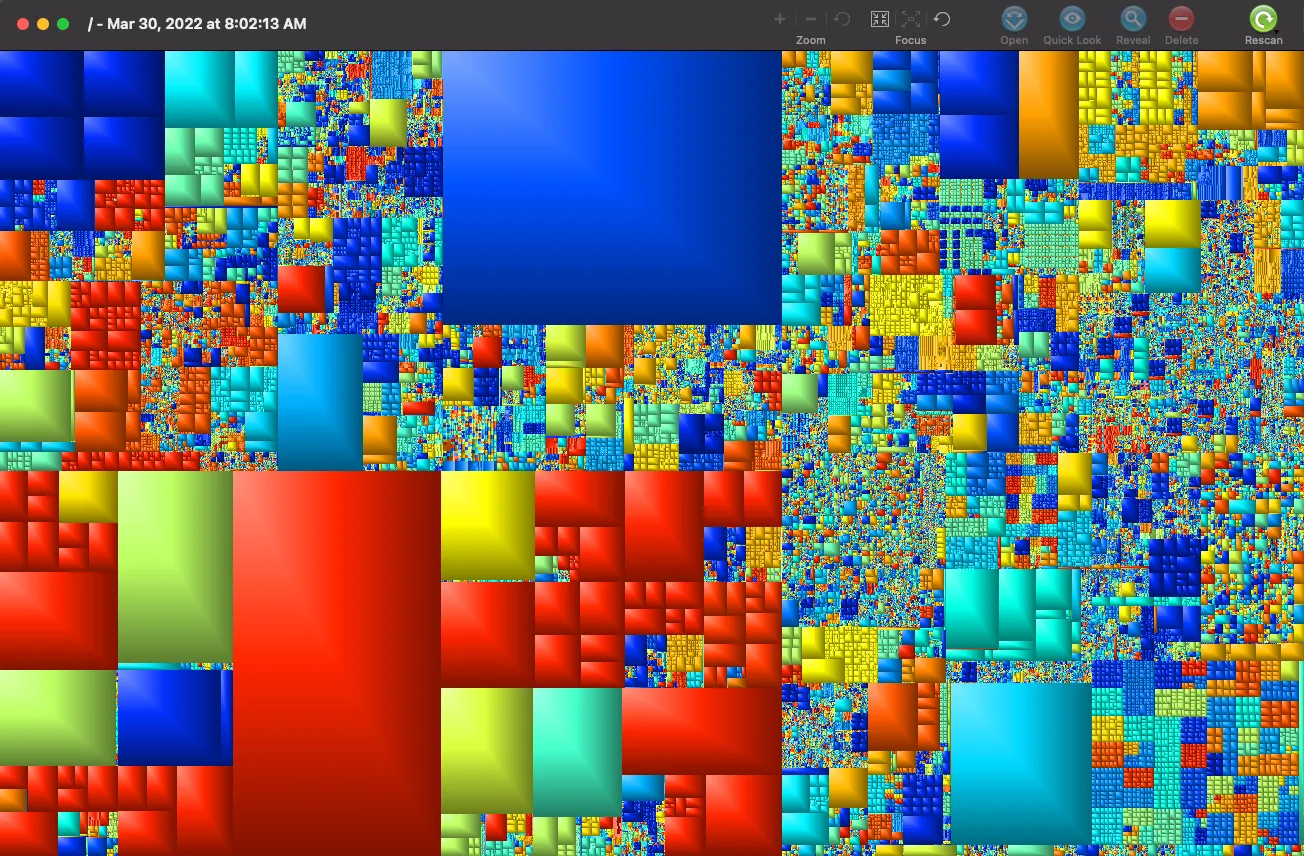
GrandPerspective will show you where and how you are using up your space.

Get this: I had 64GB of my 256GB allocated to a Docker image I wasn’t even using anymore.

Deleting it meant I could actually save my dissertation file changes. 🎉 🔥 ⚡️

Graphical breakdown of my hard drive storage usage

Credits

Thanks to Link Davis, on this thread for putting me on to the GrandPerspective app and the technique of running it with increased permissions.

NOTE: Obviously, if you have government secrets on your computer, you already know that you shouldn’t give some app downloaded off the internet access to all your files. For most of us, however, we’re simply interested in freeing up storage.

Permalink →

Django Drive-Through Analogy

2023-06-24 · 4 min read

Originally posted: 2020-02-29

Django architecture explained in a simple and relatable analogy.

Looking for a short description of Django architecture and an analogy so you don’t forget this time?

Look no further than the drive through.

How does Django fit into a user experience?

The way a web app works is like this:

A Django web app architecture

Source

  1. Users get on their device and connect to your app somehow.

  2. A user sends some signals to your app.

  3. The app interprets those signals (via some kind of URL-mapping module, such as urls.py).

  4. The app then “handles” that signal via a request-handler module, like views.py. The tutorial notes that it makes sense to handle each resource via a different view function. The URL mapper connects the right requests with the right view functions.

  5. The app looks, through views.py, into its database (models.py), and maybe changes something.

  6. The app then sends some signals back to the user’s device using views.py, sometimes referencing some kind of layout template, e.g. blog-layout.html. Maybe this is where React.js will fit in?

The Django view component

From what I can see, the view component of a Django app takes in and spits out HTML.

It gets HTML requests from the user, and then gives the user an HTML response.

The kind of response it gives depends on how it interacts with the model component, which is the database of the app.

The Django model component

The model defines what kind of data the app uses. It’s also the place where the data is stored.

So how does all of this work together?

Django by drive-through analogy

Django’s architecture can be understood by analogy to a drive-through order.

A user pulls up to the drive through. And little speaker takes their requests (their input).

This speaker is like the URL-mapping component. It sends the requests inside the building so the customer is not just yelling out of their car window as a sign.

The signals go inside to whichever headset-wearing worker is designated for handling orders. This worker is the view component.

The view component takes down the user’s order. But this order only makes sense if it includes requests the restaurant can fulfill. How does the worker know what orders can be fulfilled? By looking at the menu, of course! The menu is like the model component.

The menu defines what kinds of orders can be made. Do you want fries with that?

The worker finds out not only whether certain orders fit the menu, but also whether the raw materials are actually there. In other words, the model component doesn’t just tell you what kind of orders the restaurant fulfills, but it also allows you to query existing instances of that data.

When the user pulls up to the window, the view component (who took the order) returns information about payment, and, let’s hope, actually hands over the meal. The meal is like the response.

But if you’ve ever been to a drive through, then you know they they don’t just pour the fries into your lap, maybe splashing a soft drink on top (coning, anyone?).

No. Each restaurant has its own conventions for handing stuff over. Drinks come in a cup. More than one cup comes in a tray. Food is in a big, and the straws and napkins are in there too.

This convention for packaging the response is like the template. The template gives the view a scaffolding it can fill up with response items.

Simple, right?
Permalink →

Flatten XML via JSON

2023-06-24 · 2 min read

Originally posted: 2021-01-02

Flatten an XML tree by turning it into JSON first (Python)

Going Directly from XML to JSON Using xmltodict:

It’s pretty straightforward to turn an XML file into a Python dictionary (which is essentially the same as a JSON file’s content).

The code snippet below can be copied and pasted into your terminal, and it will prompt you to select a file.

If you run into ModuleNotFoundErrors, simply type the following into your Python terminal:

pip or pip3 import [NAME OF MISSING MODULE HERE]

import xmltodict, json
xml_filepath = input('Drag and drop an XML file here:').strip()
with open(xml_filepath) as xml_file_input:
    xml_data_stream = xml_file_input.read()
    data_dict = xmltodict.parse(xml_data_stream)

Flatten JSON recursively with Python

I came across a nice, succinct, and effective piece of code to accomplish what I needed. Thanks Amir Ziai!

import json
 
def flatten_json(y): # or use `pip install flatten_json`
    out = {}
 
    def flatten(x, name=''):
        if type(x) is dict:
            for a in x:
                flatten(x[a], name + a + '_')
        elif type(x) is list:
            i = 0
            for a in x:
                flatten(a, name + str(i) + '_')
                i += 1
        else:
            out[name[:-1]] = x
 
    flatten(y)
    return out
 
json_filepath = input('Drag and drop a JSON file here:').strip()
with open(json_filepath) as json_file_input:
    string_data_stream = json_file_input.read()
    json_data_stream = json.loads(string_data_stream)
    flat_json = flatten_json(json_data_stream)
 

In case you run into an error about an extra character being at the end of your file, you can just leave off the final one (or two, etc.) characters by adding an index to the end of your string_data_stream, for example:

json.loads(string_data_stream[:-1])

Don’t Forget to Save Your Flattened JSON Data

with open('flattened_xml_via_json.json', 'a') as save_file:
    save_file.write(json.dumps(json_data_stream, indent=4, sort_keys=True))
Permalink →